
Wondering how to download videos from Meta AI without struggling with screen recording or complicated software? You're not alone. As AI-generated videos become increasingly popular, more people want an easy way to save their creations, watch them offline, or use them in personal creative projects. The good news is that you don't need advanced technical knowledge to get started.
With the free Meta AI Video Downloader from VerseVidSavers, you can save supported Meta AI-generated videos directly to your device using a shareable video link. The tool is designed to make downloading simple, whether you're using a smartphone, tablet, or computer.
In this guide, we'll explore how the downloader works, why it can be useful, what makes it different from screen recording, and what you should know about safety and responsible video downloads.
What Is Meta AI and Why Do People Download Its Videos?
Meta AI is an artificial intelligence assistant developed by Meta. It helps users explore creative ideas, generate content, and interact with AI-powered features across supported Meta services.
One of its interesting creative applications involves AI-generated visual content. Depending on the features available to your account and region, you may be able to create or interact with AI-generated video clips.
These videos can be useful for experimenting with storytelling, developing visual concepts, or sharing creative ideas.
Imagine generating a short animated scene that looks exactly how you pictured it. Naturally, you might want to save that clip rather than search through an earlier conversation whenever you need it.
Downloading a video also makes it easier to organize your creations, view them without an internet connection, and import them into compatible editing applications.
However, obtaining a downloadable video file isn't always as straightforward as watching the clip online. That's where a dedicated downloader can help.
How to Download Videos from Meta AI Using VerseVidSavers
If you have a supported Meta AI video share link, downloading the clip through VerseVidSavers is designed to be straightforward.
You don't need to install a separate downloader application or understand complicated video formats.
Step 1: Open Meta AI and Copy Your Video Link
Start by opening Meta AI through a supported interface and locating the video you want to save.
Look for the Share option associated with the video. If the interface provides a shareable URL, select Copy Link.
Make sure you copy the actual video share link rather than the address of an unrelated page.
The availability and location of sharing options can vary depending on the Meta AI interface you're using.
Step 2: Visit the Meta AI Video Downloader
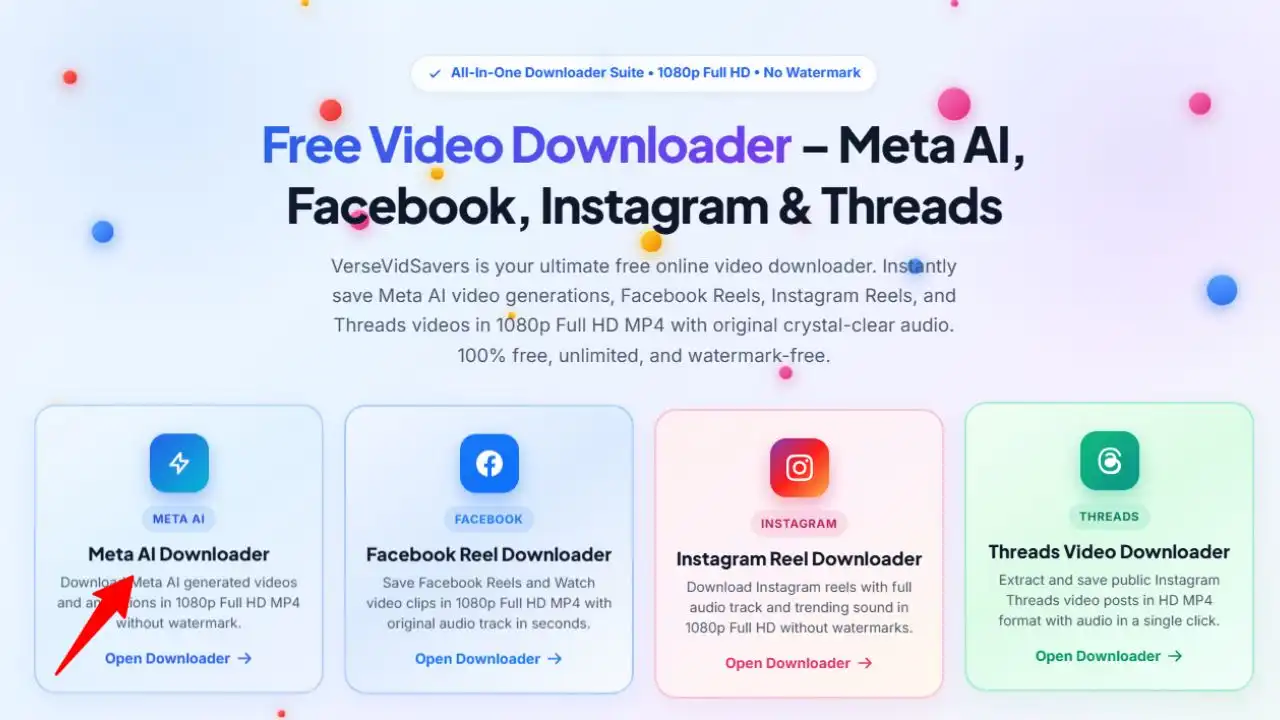
Open your preferred web browser and visit: versevidsavers.com
You will see there four social media downloader tools Select First On Meta AI Video downloader.
Paste your copied Meta AI share URL into the provided field and select the Download button.
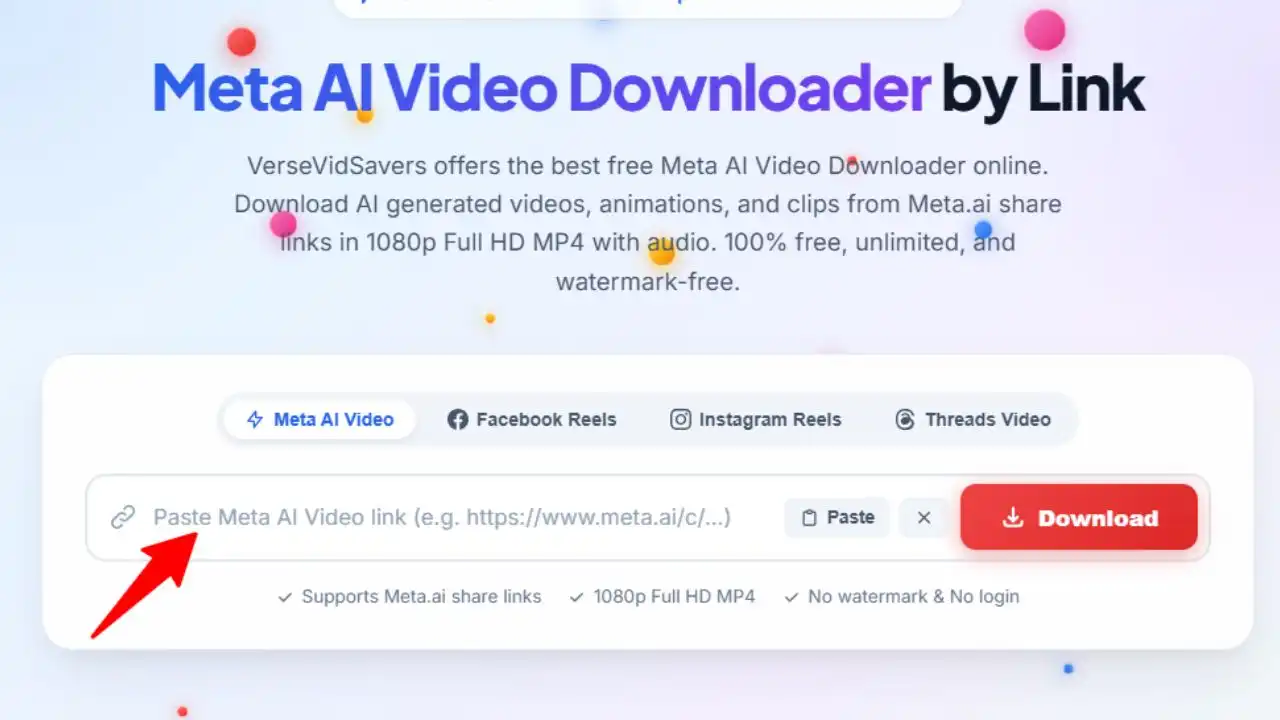
The tool is designed to process supported share links and locate an available video stream.
Step 3: Download and Save Your Meta AI Video
Once the video has been processed successfully, choose the available download option.
VerseVidSavers advertises MP4 downloads, including Full HD 1080p when that resolution is available from the source.
Your browser may save the file automatically or ask you where to store it, depending on your device settings.
After the download finishes, open the video using your gallery, file manager, or preferred media player.
That's the basic process for saving a supported Meta AI video without relying on screen recording.
Why Use a Meta AI Video Downloader?
When you can already watch a video online, you might wonder why downloading it matters. The answer depends on how you plan to use your AI-generated content.
For someone experimenting with AI video creation, keeping a local copy can make the creative process more convenient. Instead of reopening a conversation to find an earlier result, you can organize clips into folders and revisit them whenever inspiration strikes.
Content creators may also want to compare different AI-generated scenes, study their visual details, or combine their own authorized clips into a larger project.
Students and educators can benefit from keeping permitted AI-generated examples available for presentations or demonstrations.
Another advantage is offline access. Once a video is saved successfully, you can watch the local file without repeatedly loading it from the original website.
A downloader doesn't automatically give you permission to publish or redistribute someone else's work, but it can make managing videos you're entitled to use much easier.
Key Features of the VerseVidSavers Meta AI Video Downloader
A useful video downloader should make the process simple while preserving the quality of the available content.
VerseVidSavers focuses on several features that are especially relevant to people working with AI-generated videos.
Free Online Video Downloading
One of the main benefits of VerseVidSavers is that its Meta AI downloader is offered as a free web-based tool. According to the website, users don't need a paid subscription to access its download functionality.
This can be convenient for people who occasionally save AI-generated clips and don't want to purchase dedicated software. Because the tool operates through a website, there's also no separate downloader application to install.
HD MP4 Video Support
Video quality matters, especially when you're saving clips for editing or viewing on a larger screen. VerseVidSavers supports MP4 video downloads and advertises resolutions up to 1080p Full HD.
MP4 is widely supported by modern smartphones, computers, and editing applications, making it a practical format for everyday use.
Keep in mind that the actual resolution depends on the video stream available from the source. A downloader cannot restore visual details that aren't present in the original file.
Download Meta AI Videos Without Watermark
Another advertised feature is the ability to save supported Meta AI video streams without an added watermark.
This can be helpful when you want to view your own creations without unnecessary visual distractions. However, whether a downloaded file contains an existing logo, watermark, or other marking depends on the source video and the available stream.
It's also important to respect any attribution requirements and avoid removing ownership information to misrepresent another creator's work.
Video Downloads With Audio
Sound can play an important role in making a video engaging. A short animation might include background music, environmental sounds, or dialogue that contributes to the overall experience.
VerseVidSavers states that its downloader can preserve the audio track when one is included in the available source stream.
If the original video doesn't contain audio, downloading it won't generate a soundtrack automatically.
No Meta Account Login Required
One particularly convenient feature is that VerseVidSavers does not require you to enter your Meta or Facebook account password to use its downloader.
Instead, the process relies on a supported shareable video link. This reduces the need to disclose account credentials to a third-party website.
How Safe Is the Meta AI Video Downloader?
Safety is an important consideration whenever you use an online downloading service. VerseVidSavers states that its Meta AI downloader doesn't require account credentials and that it doesn't store download logs or track personal data.
These are useful privacy-related claims, although users should consult the website's current privacy policy for more information about how data is handled. As a general precaution, never enter your Meta, Facebook, Instagram, or WhatsApp password into an unrelated downloader website.
You should also avoid submitting private or sensitive video links to third-party tools unless you're comfortable with the potential privacy implications. Use the official website address, be cautious of unexpected redirects, and keep your browser updated.
Downloading ordinary MP4 files from a trusted source is generally more straightforward than installing unknown software, but no online service should be considered completely risk-free.
The safest approach is to use the downloader only for content you own or have permission to save, while following normal online security practices.
Why Downloading Meta AI Videos Is Better Than Screen Recording
Screen recording might seem like the easiest way to save a video, but it isn't always the most convenient solution. When you record your screen, you're capturing whatever appears on the display rather than downloading the original video file.
That means interface elements, notifications, or playback controls can accidentally appear in your recording. Screen recording may also introduce additional compression or capture audio incorrectly, depending on your device and recording settings.
A direct video download, when available, can avoid these issues by saving the accessible media stream instead of recording the screen during playback. It may also save time because you don't have to play the entire video while recording it.
However, direct downloading isn't guaranteed to produce higher quality in every situation. The final result still depends on the source file and how the downloader processes it.
For users who want a clean copy of an authorized video, direct downloading is often the more practical option.
Can You Download Meta AI Videos on Android, iPhone, and PC?
Yes, VerseVidSavers is designed as a browser-based downloader, making it accessible across different types of devices.
On an Android phone, you can open the downloader in a browser such as Chrome, paste your Meta AI video link, and download the available file. Depending on your phone's settings, the video will usually appear in the Downloads folder.
For iPhone and iPad users, Safari can be used to access the website. After downloading an MP4 file, you may find it in the Files app. From there, you can use the sharing options to save a compatible video to Photos.
On a Windows computer or Mac, the process is similar. Open the website, paste the link, and save the video to your preferred location.
You don't need a different set of instructions for every device, although file-saving options can vary by browser and operating system.
What If Your Meta AI Video Isn't Downloading?
Occasionally, a video link may fail to process. This doesn't necessarily mean there's something wrong with your device. The link may be incomplete, expired, restricted, or unsupported. The original video might also have been removed or made unavailable.
First, check that you've copied the correct shareable video URL. If the original interface allows it, try generating a fresh share link and submitting it again. You can also refresh the downloader page or try another updated browser.
If the video remains unavailable, avoid using tools that promise to bypass private access controls or other restrictions.
Not every video can be downloaded through a third-party service, and respecting those limitations is important.
Is It Legal to Download Videos from Meta AI?
Downloading AI-generated content raises questions about copyright, ownership, and permitted use. Creating a video with AI doesn't automatically mean that every element of the video is free from copyright restrictions.
The applicable rights may depend on the content, the relevant platform terms, the source materials, and the laws of your country. If you've created a video yourself, review Meta's applicable terms before using it commercially or distributing it elsewhere.
If someone else created the video, obtain any permission required before reposting, editing, or publishing it. Downloading a file for personal reference is not necessarily the same as having permission to redistribute it.
VerseVidSavers is an independent downloading utility and is not officially affiliated with Meta. Users remain responsible for respecting intellectual property rights and applicable platform rules.
Frequently Asked Questions About How to Download Videos from Meta AI
QHow can I download videos from Meta AI for free?
You can use the VerseVidSavers Meta AI Video Downloader. Copy a supported Meta AI video share link, paste it into the downloader, and select the available download option. The service is advertised as free to use.
QCan I download Meta AI videos without a watermark?
VerseVidSavers offers downloads from supported video streams and advertises watermark-free results. Whether a particular file contains a watermark depends on the original source and available video stream.
QDo I need to install an app to download Meta AI videos?
No. VerseVidSavers works through a web browser, so a separate downloader application isn't required.
QCan I save Meta AI videos in 1080p Full HD?
The tool advertises support for Full HD 1080p MP4 downloads. However, the available resolution depends on the original video stream.
QIs VerseVidSavers safe for downloading Meta AI videos?
The website states that it doesn't require Meta login credentials and makes privacy-related assurances. Users should still review its privacy policy, avoid sharing sensitive links, and follow standard browsing precautions.
QWhy is my Meta AI video link not working?
A link might be expired, incomplete, restricted, or unsupported. Try copying the share link again, generating a new one if possible, or checking whether the original video is still accessible.
QCan I download Meta AI videos with sound?
Yes, the downloader is designed to preserve available audio alongside the video. If the original stream contains no audio, the downloaded file will not have sound added to it.
Learning how to download videos from Meta AI doesn't have to involve complicated software, screen recording, or technical expertise.
For users with supported shareable links, VerseVidSavers provides a convenient online option for saving AI-generated videos as MP4 files. Its free access, browser-based workflow, advertised HD support, and lack of account login requirements make it worth considering for personal creative projects.
Whether you're organizing your AI creations, keeping clips for offline viewing, or preparing authorized videos for editing, having a straightforward way to save your files can make the process easier.
Just remember that video availability, resolution, and audio depend on the original source, and downloading content doesn't replace the need to respect copyright and platform terms.
Ready to save your next AI-generated video? Visit the Meta AI Video Downloader on VerseVidSavers paste your supported video link, and explore the available download options.